Key Takeaways
- SaaS SEO drives sustainable, long-term growth by lowering CAC and compounding traffic beyond paid acquisition.
- Mapping keywords to TOFU, MOFU, and BOFU ensures content attracts, nurtures, and converts across buyer journeys.
- Effective SaaS SEO blends product-led content, technical optimization, and scalable strategies like programmatic SEO.
- Measuring success requires revenue-focused KPIs, including free trials, conversions, ARR growth, and customer retention impact.
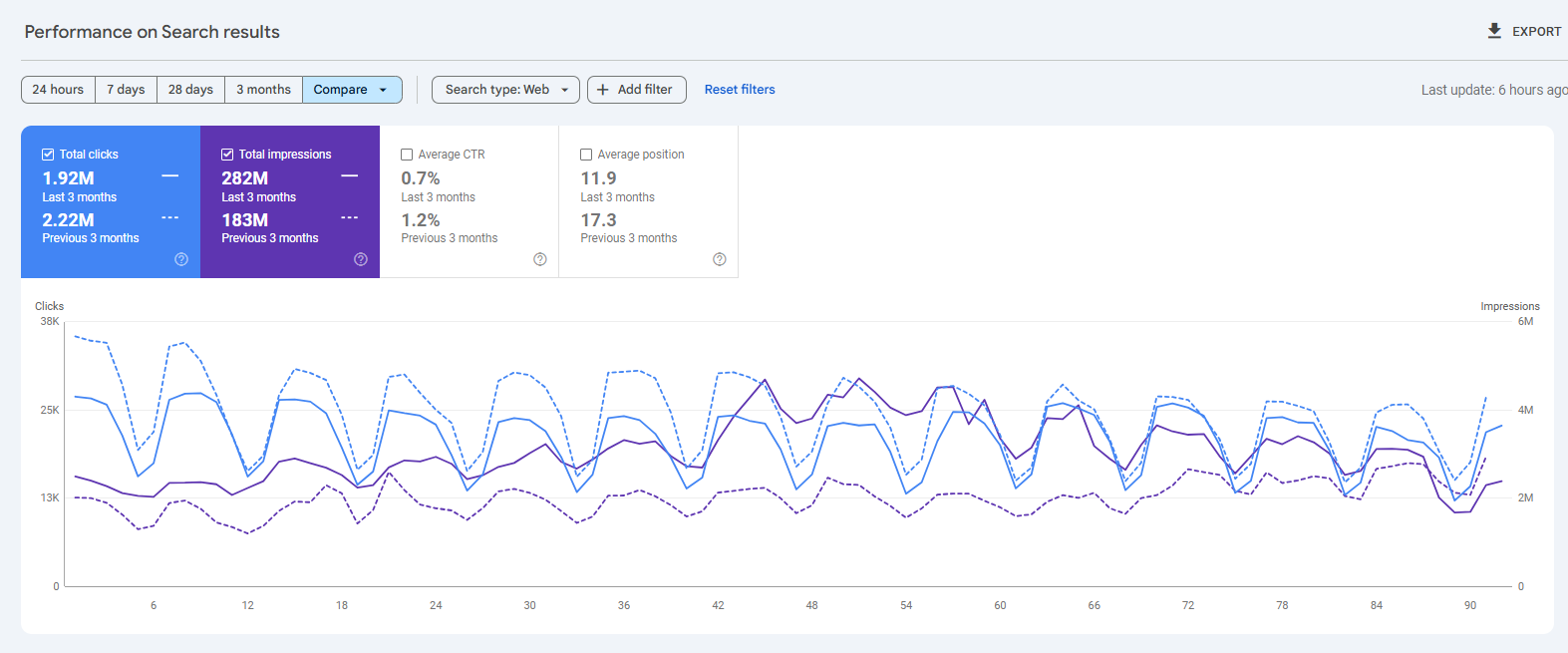
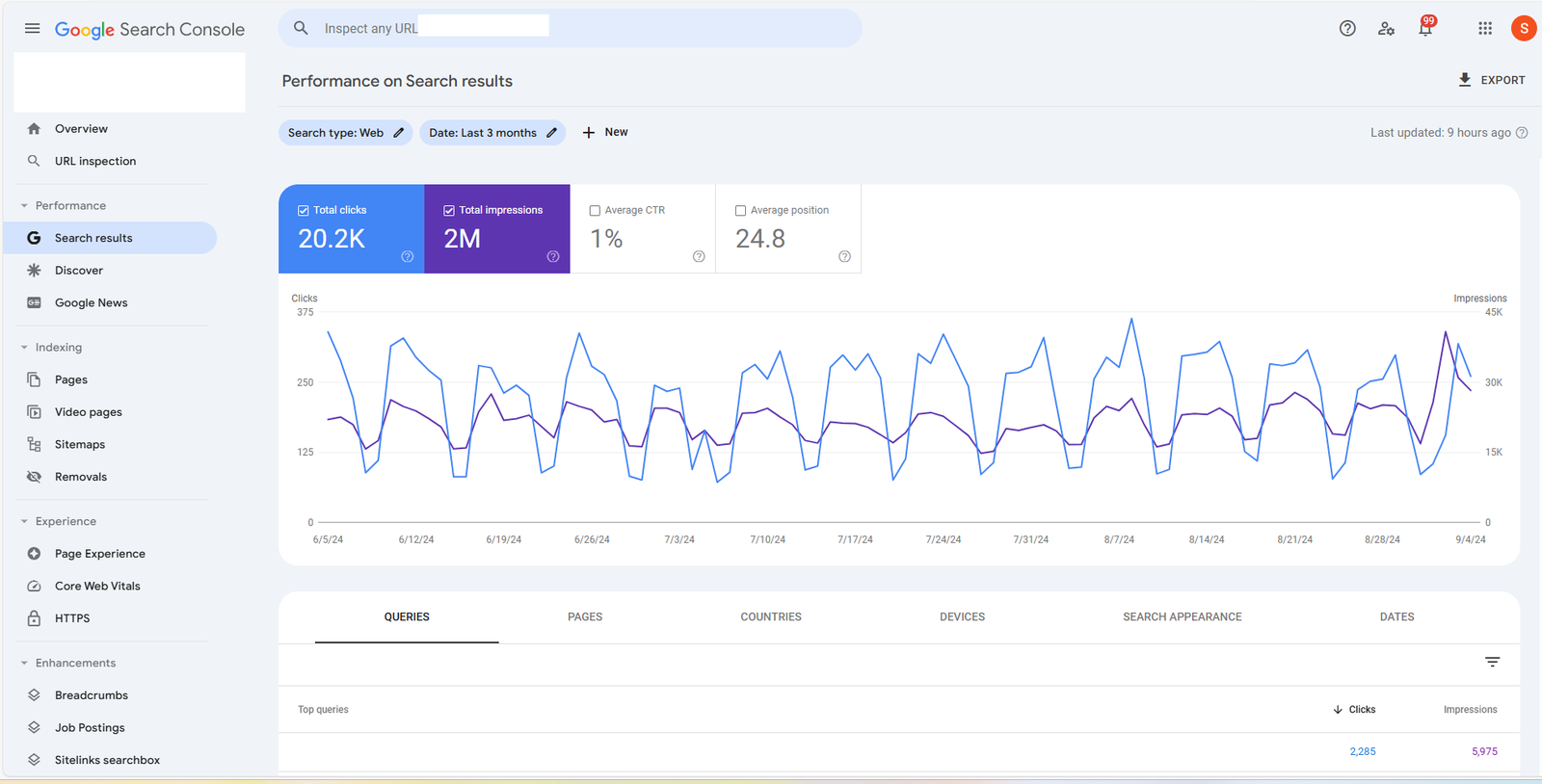
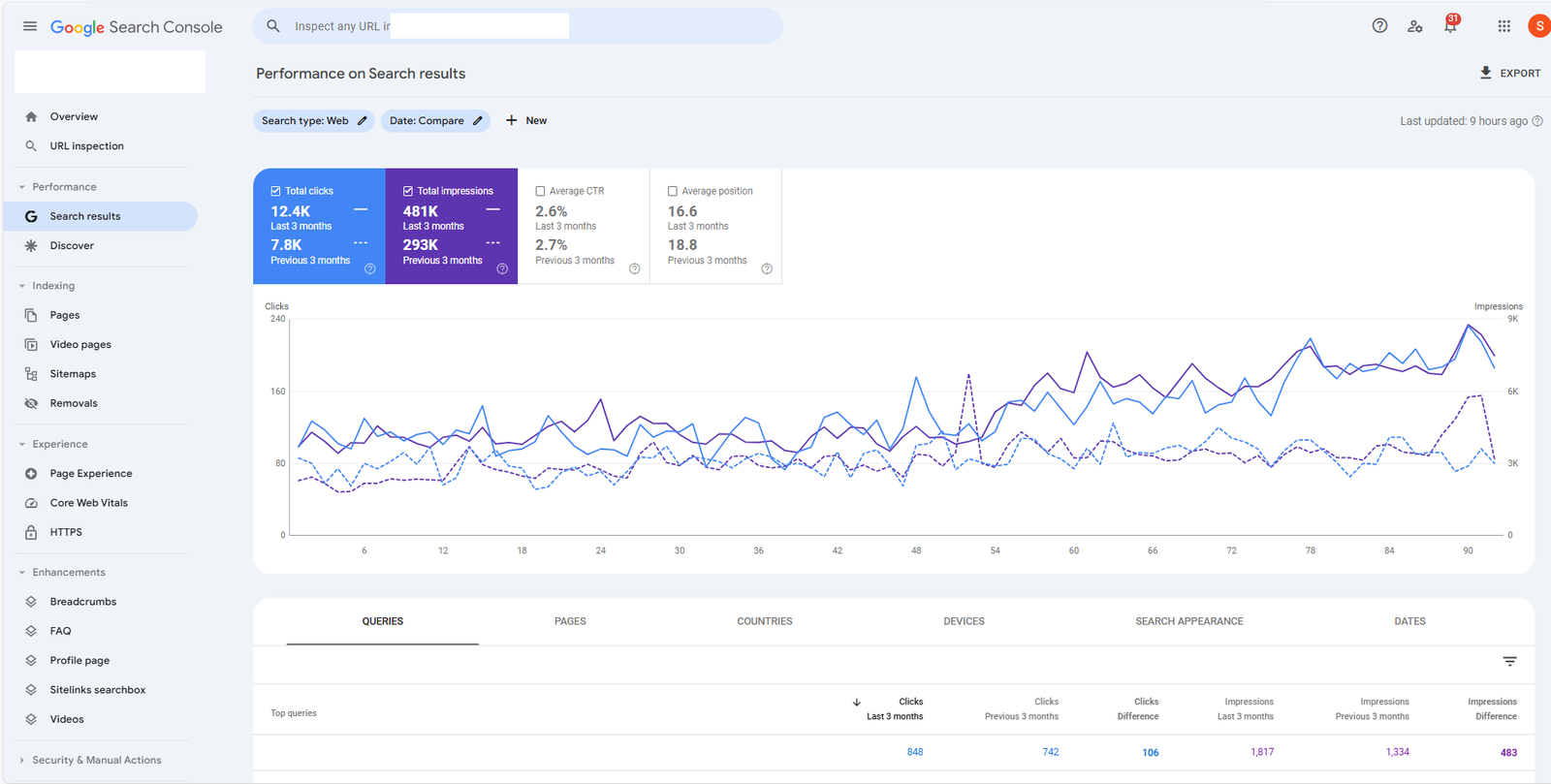
For the past few years I have been testing different SaaS SEO Strategies and I have gotten some great results at many companies including SocialPilot, Writesonic and we were able to get good quality signups only from organic traffic.
I have worked as CMO of many SaaS companies and in this post, I will breakdown SaaS Strategies that have worked well and how SaaS SEO is slightly different than regular SEO.
In the world of SaaS, growth is everything, but not all growth is created equal. Paid acquisition can drive quick wins, but it’s expensive, unpredictable, and rarely sustainable. That’s why high-performing SaaS companies are turning to SEO not just as a marketing channel, but as a long-term growth engine.
SaaS SEO is more than blogging or sprinkling keywords on your homepage. It’s a strategic, product-aligned, data-driven approach to capturing organic demand across every stage of the buyer journey, from the first question a prospect asks to the final product comparison before they convert.
It’s what allows brands like Zapier, Notion, and HubSpot to generate millions of monthly visits which results in thousands of signups that too without spending a dollar on ads.
Whether you’re a bootstrapped startup or scaling beyond Series A, mastering SaaS SEO means building a traffic machine that compounds over time, lowers CAC, and supports every part of your funnel.
What is SaaS SEO?
SaaS SEO (Search Engine Optimization for Software-as-a-Service businesses) is the process of increasing a SaaS product’s organic visibility in search engines like Google to attract, engage, and convert users at every stage of the customer journey.
But unlike traditional SEO, SaaS SEO is uniquely complex. It’s not just about ranking blog posts or optimizing your homepage. It requires:
- Mapping search intent to a non-linear, multi-touch funnel
- Creating content that matches product use cases
- Optimizing landing pages, help docs, and even user-generated or programmatically created assets
- Supporting PLG (Product-Led Growth) and sales-assisted models simultaneously
In essence, SaaS SEO is about using search as a growth channel to:
- Drive qualified traffic
- Nurture leads across the funnel
- Reduce customer acquisition costs (CAC)
- Improve activation and retention through content and discoverability
In Simple Terms:
SaaS SEO is the art and science of ranking your product, features, and solutions in Google so your ideal customers can discover you when they’re searching for exactly what you offer.
Why Is SEO Important for SaaS Companies?
In SaaS, growth is important but the cost and sustainability of that growth matters more than ever. While paid ads and outbound tactics can help you scale fast, they come with rising costs and diminishing returns. That’s where SEO becomes your most scalable, compounding, and cost-effective acquisition channel.
1. Scale Growth Without Relying on Paid Ads
SaaS companies often burn cash on paid acquisition. But the moment you pause spend, traffic disappears.
SEO, on the other hand:
- Delivers consistent, free traffic month after month
- Builds brand visibility across the funnel
- Supports both PLG and sales-led models
Once you’re ranking for the right queries, traffic and leads grow organically while you can focus on other acquisition channels.
2. Reduce Customer Acquisition Costs (CAC)
Paid channels have rising CPCs. Sales-led models rely on human resources. SEO provides:
- Lower CAC over time
- Better ROI on content and brand assets
- Compounding value which means every blog, template, or landing page becomes a long-term lead generator
SEO helps you acquire more users without increasing spend.
3. Support Long Sales Cycles with Organic Nurturing
SaaS buyers rarely convert after one touch. SEO helps nurture users across a multi-stage, non-linear funnel:
- TOFU content attracts awareness
- MOFU guides educate and compare
- BOFU content converts (e.g., integrations, use cases, pricing pages)
All while building trust without requiring your sales team to chase every lead.
4. Expand Global Reach (Without Hiring International Teams)
SaaS products are often location-agnostic but that doesn’t mean your traffic is.
SEO enables:
- Global visibility without global ad spend
- International SEO targeting (e.g., /in, /uk, hreflang)
- Evergreen traffic from new and emerging markets
Your website becomes a 24/7, multilingual acquisition team.
5. Convert Users from Other Channels (Search Assist & Retargeting)
Even users who first discover you via social, ads, or events often return through Google.
Strong SEO helps you:
- Capture branded and non-branded return traffic
- Show up during decision-making moments
- Close the loop on leads acquired elsewhere
SEO plays a key role in multi-touch attribution and delivers the final nudge before conversion.
How SaaS SEO Is Different from Traditional SEO
SaaS companies have unique SEO needs that go beyond the traditional blog-and-backlink playbook. Here’s a side-by-side comparison of how SaaS SEO differs from traditional SEO across key strategic dimensions:
| Aspect | Traditional SEO | SaaS SEO |
| Funnel Focus | Primarily top-of-funnel (TOFU) content like blogs and guides | Covers the entire funnel: TOFU, MOFU (comparisons), BOFU (trials, demos), and post-signup stages |
| Content Type | Blog-first, informational | Product-led content (templates, integrations, use cases, help docs, feature pages) |
| Conversion Goal | Email signups, affiliate clicks, lead forms | Free trial signups, demo bookings, product activation, feature discovery |
| Scalability | Manual page-by-page publishing | Scalable via programmatic SEO (e.g., integration pages, template libraries) |
| Buyer Journey Complexity | Simple funnel, single decision-maker | Multi-touch journey, multiple stakeholders, long sales cycles |
| Support for Product | Rarely aligns with product experience | SEO built into product experience (user flows, templates, onboarding) |
| Retention Content | Limited focus | Essential (help docs, FAQs, onboarding content rank for support queries) |
| Measurement Metrics | Rankings, traffic volume, bounce rate | Revenue-driven KPIs: trials, conversions, CAC, LTV, MRR |
| Team Involvement | Owned by marketing/content teams | Cross-functional: marketing, product, engineering, content |
| SEO Assets | Homepage, blog posts, category pages | Blog + product pages, pricing, integrations, documentation, programmatic templates |
12-Step SaaS SEO Strategy Framework
Building a successful SaaS SEO engine doesn’t happen by accident, in most cases, it requires a structured, strategic approach aligned with your product, audience, and growth goals.
Here’s a proven 12-step framework that SaaS companies use to drive sustainable, compounding organic growth and this is not just rankings or vanity traffic.
Step 1: Set Clear SEO Goals and KPIs
Before writing a single word or optimizing a page, define what success looks like for your SaaS SEO program.
Your SEO goals should align with business outcomes like:
- Increase in signups or free trials
- Increase in demo requests or sales-qualified leads (SQLs)
- Improved conversion rate from organic traffic
- CAC reduction through organic channels
- Growth in organic contribution to MRR or ARR
Core SEO KPIs to track:
- Organic traffic (by page type or funnel stage)
- Rankings for key transactional keywords
- Click-through rates (CTR) from SERPs
- Trial/demo conversions from SEO pages
- Backlink velocity and domain authority
- Indexed vs. non-indexed pages
- Crawlability and technical health
Tip: Separate goals by stage (e.g., TOFU traffic, BOFU conversions) to measure full-funnel performance.
Step 2: Conduct Keyword Research by Funnel Stage
One of the biggest mistakes SaaS companies make is treating keyword research as a one-size-fits-all activity. In reality, keyword intent varies widely across the customer journey and your research should reflect that.
SaaS keyword research must map to the funnel: TOFU, MOFU, and BOFU.
This ensures you attract the right users at the right time and guide them toward conversion.
TOFU Keywords (Top of Funnel – Awareness)
These keywords are problem-aware. Users are looking for solutions, education, or industry knowledge but may be not specific tools (yet).
Examples:
- “How to improve team collaboration”
- “What is employee onboarding?”
- “Ways to automate reports”
Goal: Drive traffic and build topical authority with educational content.
Pro tip: Use tools like Google Autosuggest, AnswerThePublic, and Reddit to find questions and pain points.
MOFU Keywords (Middle of Funnel – Consideration)
MOFU users are solution-aware. They know what kind of solution they need and are starting to compare their options.
Examples:
- “Best project management tools for remote teams”
- “Notion vs Airtable”
- “HR software for startups”
Goal: Position your product in the conversation and attract high-intent traffic.
Pro tip: Cluster keywords into use cases, industry segments, and comparison pages.
BOFU Keywords (Bottom of Funnel – Decision)
These are purchase-ready queries. Users are actively searching for a product, trial, pricing, or a specific feature.
Examples:
- “CRM with Gmail integration”
- “Free email signature generator”
- “Get started with proposal software”
Goal: Capture demand and drive direct conversions.
Pro tip: Target long-tail variations (e.g., “best free CRM for real estate agents”) to reduce competition and boost conversion.
Keyword Research Outputs to Organize
Your final output should include:
- Target keyword
- Funnel stage (TOFU/MOFU/BOFU)
- Search intent
- Search volume
- Difficulty score
- Mapped content type (e.g., blog, comparison page, template page)
- Target URL (if existing or planned)
Use this keyword map as your source of truth to plan and prioritize all future SEO content.
Step 3: Analyze Your Competitors
SaaS SEO doesn’t happen in a vacuum. To build a winning strategy, you need to understand what your top-performing competitors are doing and how you can outperform them.
Competitive analysis helps you:
- Discover content gaps
- Identify keyword opportunities
- Benchmark performance
- Uncover backlink strategies
- Learn what’s already working in your niche
The goal isn’t to copy but rather to strategically outperform with better structure, content, and intent alignment.
Types of SaaS Competitors to Analyze
Not all competitors are direct competitors. You should analyze three types:
- Direct Product Competitors
Tools in the same category targeting the same audience (e.g., Notion vs. Coda) - Search Competitors
Websites ranking for your target keywords even if they don’t offer the same product (e.g., HubSpot blog, G2) - Content/Template/Directory Competitors
Sites ranking with listicles, templates, or aggregators (e.g., ClickUp’s template library, Canva’s design templates, Medium posts)
What to Analyze
1. Top-Ranking Pages
Use tools like Ahrefs, SEMrush, or Ubersuggest to identify:
- Best-performing pages (by traffic)
- Top keywords per page
- Backlink counts and sources
- Content formats (blogs, templates, comparison pages, landing pages)
Look for patterns: Are they ranking with templates? Integrations? Help docs?
2. Content Gaps
Find what keywords your competitors rank for but you don’t.
Use Ahrefs > Content Gap or SEMrush > Keyword Gap to:
- Identify missed opportunities by funnel stage
- Surface low-competition, high-intent keywords
- Prioritize new content or pages
3. Backlink Strategies
Review their backlink profile:
- Who’s linking to their best pages?
- Are they doing guest posts, PR, or tools-based link building?
- Can you create something more valuable or newsworthy?
Pro tip: Look for backlinks to outdated or thin content and offer a better alternative.
4. Content Quality & UX
Study how competitors structure their content:
- Readability and format (H2s, bullets, visuals)
- Use of CTAs (trial, demo, template access)
- Internal linking strategy
- Speed and mobile optimization
Ask: Can we make this faster, clearer, more actionable, or more product-led?
Step 4: Create High-Value, Product-Led Content
Content is the engine of SaaS SEO but not just any low quality content. In a world flooded with generic blog posts, the most successful SaaS companies win by creating product-led content that’s tailored to real problems, real intent, and real features.
This type of content doesn’t just inform, it is meant to convert. It shows users how your product solves the problem they just searched for.
What Is Product-Led Content?
Product-led content is SEO-driven content that’s:
- Directly tied to product features, use cases, or outcomes
- Built around search intent that matches your solution
- Designed to guide readers from problem to product naturally
Unlike traditional blog content, product-led content doesn’t just talk about the topic but it demonstrates your product in action, helping users experience its value before they sign up.
Examples of Product-Led Content in SaaS
| Type | Example | Why It Works |
| Template Pages | “Content Calendar Template” (Notion) | High-intent searchers can try the product immediately |
| Use Case Pages | “Automate Employee Onboarding” (Zapier) | Shows how the product solves specific workflow problems |
| Comparison Pages | “Asana vs Trello” | Captures high-converting searchers in decision mode |
| Integration Pages | “Slack + Google Calendar Integration” | Ranks for long-tail intent, leads to product trial |
| Tool Pages | “Free Invoice Generator” (HubSpot) | Delivers value first, then invites users into the product |
How to Build High-Value Product-Led Content
1. Start with a Real Keyword + Real Problem
Choose a keyword that reflects a user pain point your product directly solves.
Example:
Keyword: “automate onboarding emails”
Pain point: Manually onboarding new employees
Your product value: Automated email workflows for onboarding
2. Educate First, Convert Second
Break down the topic clearly and helpfully:
- Show why the problem matters
- Walk through how to solve it
- Introduce your product as a natural solution
In SaaS SEO, it is important that you educate, then convert.
3. Embed Product Visuals, Demos, or CTAs
Use real screenshots, embedded videos, GIFs, or interactive elements to:
- Show exactly how your product handles the problem
- Reduce friction for signups or trials
- Increase trust through transparency
Add contextual CTAs: “Try this workflow,” “Use this template,” or “See it in action”
4. Match the Right Format to the Right Intent
| Intent | Ideal Format |
| “How to…” | Blog tutorial + feature walkthrough |
| “Best tools…” | Listicle with embedded product + CTA |
| “Free template…” | Dynamic template landing page |
| “X vs Y” | Comparison page with feature breakdown |
| “Tool for…” | Solution page highlighting your product |
5. Link Strategically
- Link to help docs, support content, and related product features
- Use internal links to push authority to your most valuable BOFU pages
- Build SEO clusters that support your product categories
Real-World Tip:
You don’t need to write 100 articles.
You need 30–50 high-quality, product-led pages that rank, convert, and compound value over time.
Step 5: Optimize Your Content for SEO
Creating great content is only half the battle but to rank well and drive consistent traffic, your content needs to be strategically optimized for search engines and users.
For SaaS companies, this means combining on-page SEO best practices with conversion-oriented UX, all while keeping your content aligned to product value and search intent.
1. Nail the Basics of On-Page SEO
Every piece of content should follow fundamental SEO principles:
- Title Tag: Include your primary keyword early; keep under 60 characters
Example: “Employee Onboarding Checklist Template – Free Download” - Meta Description: Use 150–155 characters to entice clicks and include related terms
- URL Slug: Short, clean, and keyword-focused
Example: /remote-onboarding-checklist/ - H1 Tag: Use the main keyword naturally to be specific, only one H1 per page
- Subheadings (H2, H3): Break down the content logically with secondary keywords
- Internal Links: Link to related BOFU pages, product features, help docs, and other articles
- External Links: Reference credible sources where relevant (Google, Gartner, HubSpot, etc.)
2. Use Keywords Strategically (Not Excessively)
SaaS SEO requires thoughtful keyword placement and not keyword stuffing.
Where to include your primary keyword:
- Title tag
- H1 tag
- First 100 words
- At least one subheading
- Image alt text (if applicable)
- URL slug
- Naturally throughout the body
Also include LSI and semantic variations:
- Synonyms, related features, intent-driven phrases
- Use tools like Clearscope, Surfer, or MarketMuse for semantic coverage
Pro tip: Optimize for topics, not just terms. Google ranks pages that address intent, not keyword density.
3. Optimize for Readability and UX
Google rewards content that users actually engage with.
Make sure your content is:
- Easy to scan (short paragraphs, bullets, bolding key info)
- Mobile-optimized (responsive layout, large font, tappable CTAs)
- Visually supported (screenshots, charts, icons, or product GIFs)
- Clear CTA placement (mid-content and end-of-content trials, templates, or demo links)
If it’s hard to read, it’s hard to rank.
4. Add Schema and Structured Data
Enhance your visibility in search results with structured data (schema markup):
- FAQ Schema – Great for TOFU/MOFU content with Q&A format
- How-To Schema – Helps step-by-step tutorials gain visibility
- Review Schema – Use on product pages or integrations with ratings
- Breadcrumbs & Sitelinks – Improves navigation in SERPs
Use tools like Google’s Rich Results Test to validate your structured data.
5. Refresh, Update, and Consolidate Regularly
SEO isn’t “set it and forget it.” Content decays over time.
Build a system to:
- Refresh outdated content every 6–12 months
- Update internal links and product screenshots
- Consolidate thin or overlapping content into stronger pages
- Reoptimize based on GSC performance (CTR, position, impressions)
Use Google Search Console to identify declining or underperforming content and adjust accordingly.
Step 6: Run Technical and On-Page SEO Audits
Even the most brilliant content can underperform if your website is slow, broken, or hard to crawl. That’s why technical SEO is critical for SaaS websites that often include complex architecture, dynamic content, and multiple user flows.
Regular audits help you:
- Ensure search engines can crawl and index your content properly
- Prevent performance issues that hurt rankings and conversions
- Identify and fix issues that silently damage organic visibility
Let’s break it down into two parts: Technical SEO and On-Page SEO.
Technical SEO Audit Checklist
- Crawlability and Indexability
- Use tools like Screaming Frog, Sitebulb, or Ahrefs Site Audit
- Check if important pages (product, blog, integrations) are:
- Indexed in Google (site:yourdomain.com)
- Not blocked by robots.txt or meta noindex
- Indexed in Google (site:yourdomain.com)
- Ensure your XML sitemap is updated and submitted to Google Search Console
- Use tools like Screaming Frog, Sitebulb, or Ahrefs Site Audit
- Site Speed & Core Web Vitals
- Use Google PageSpeed Insights or Lighthouse
- Optimize:
- Image sizes and lazy loading
- JavaScript execution
- Server response time (use CDN, caching, compression)
- Image sizes and lazy loading
- Use Google PageSpeed Insights or Lighthouse
- Mobile Usability
- Confirm your site passes Google’s Mobile-Friendly Test
- Check for:
- Tap target spacing
- Responsive design
- Readable fonts on all devices
- Tap target spacing
- Confirm your site passes Google’s Mobile-Friendly Test
- Duplicate Content & Canonicals
- Identify duplicate content from parameters, pagination, or CMS issues
- Implement correct canonical tags to consolidate authority
- Identify duplicate content from parameters, pagination, or CMS issues
- Broken Pages and Redirect Chains
- Fix all 404 errors, redirect loops, and long redirect chains
- Ensure proper use of 301s instead of 302s for permanent redirects
- Fix all 404 errors, redirect loops, and long redirect chains
- Structured Data Validation
- Check your schema markup for errors using Rich Results Test
On-Page SEO Audit: Enhance Every Page’s Performance
On-page SEO is about how well each page is optimized individually for its target keywords, structure, and UX.
- Title Tags and Meta Descriptions
- Are they unique?
- Do they include target keywords?
- Are they enticing enough to earn clicks?
- Are they unique?
- H1s and Subheadings
- Only one H1 per page
- Logical hierarchy using H2s, H3s
- Natural use of secondary keywords
- Only one H1 per page
- URL Structure
- Short, readable, keyword-rich
- Avoid numbers, random characters, or deep folder paths
- Short, readable, keyword-rich
- Internal Linking
- Are high-priority pages getting enough internal links?
- Are anchor texts descriptive and keyword-relevant?
- Are high-priority pages getting enough internal links?
- Content Optimization
- Does the content fully answer the search intent?
- Are visuals (screenshots, videos, templates) enhancing value?
- Does it include CTAs relevant to the stage of the funnel?
- Does the content fully answer the search intent?
Tools to Run These Audits:
- Screaming Frog – Full technical crawl
- Ahrefs Site Audit – Visual error tracking, Core Web Vitals
- Google Search Console – Coverage, mobile usability, Core Web Vitals
- PageSpeed Insights – Load time diagnostics
- Surfer SEO / Clearscope – On-page content scoring
- Google Analytics / GA4 – Bounce rates, page performance
Frequency: How Often Should You Audit?
| Audit Type | Frequency |
| Full site crawl | Every quarter |
| On-page reviews | Monthly |
| Technical SEO | Bi-monthly or after major changes |
| Core Web Vitals | With every design/dev deployment |
| Redirect / broken links check | Monthly or post-site changes |
Step 7: Build Authority with Backlinks
Backlinks remain one of the strongest ranking signals in Google’s algorithm even for SaaS companies, quality backlinks can be the edge you need to outrank established competitors.
But link building for SaaS isn’t about quantity. It’s about building relevant, trustworthy, and strategic links that enhance your domain authority and boost your best product-led content.
Why Backlinks Matter in SaaS SEO
- Boost ranking potential for competitive keywords
- Accelerate indexing and visibility for new pages
- Strengthen E-E-A-T (Expertise, Experience, Authoritativeness, Trustworthiness)
- Drive referral traffic from relevant sources
- Help build brand credibility in your niche
Google sees high-quality backlinks as a vote of confidence when they come from reputable, topic-relevant websites.
SaaS Link Building Strategies That Work
1. Product-Led Link Magnets
Build pages that deserve links on their own:
- Free tools (e.g., calculators, checklists, generators)
- Public templates (Notion, Airtable, Trello, etc.)
- Original research, industry benchmarks
- Use case hubs or integration guides
Example: HubSpot’s “Email Signature Generator” earns 10,000+ backlinks and promotes their CRM.
2. Guest Blogging on Relevant Sites
Write in-depth content for:
- Industry publications
- Marketing/tech blogs
- Partner blogs
Pitch value-first topics like: - How your product solves a known industry pain
- Data-backed insights from your customer base
Pro Tip: Include contextual links back to BOFU or MOFU content and not just your homepage.
3. Reverse Engineer Competitor Links
Use tools like Ahrefs or SEMrush to analyze where competitors are getting links from:
- Find outdated or low-value content you can improve
- Reach out to editors offering a better resource
- Target “list of tools,” “top software,” or “best platforms” roundups
4. Digital PR and Thought Leadership
If you’ve launched a unique feature, closed a funding round, or run a survey:
- Pitch the story to SaaS and tech publications
- Use Help A Reporter Out (HARO), Terkel, or Featured to get quoted
- Share proprietary data in exchange for attribution
5. Partnership and Integration Pages
Leverage your ecosystem:
- Create mutual backlinks with integration partners
- Get listed on partner marketplaces or app stores
- Build co-marketing content (e.g., “How X + Y streamline Z”)
How to Track Your Link-Building Efforts
| Metric | Tool |
| New referring domains | Ahrefs / SEMrush |
| Domain authority (DA/DR) | Moz / Ahrefs |
| Backlink quality (spam score) | Moz |
| Anchor text profile | Ahrefs |
| Referral traffic | Google Analytics / GA4 |
Set quarterly targets (e.g., +15 high-authority links per quarter) and monitor link growth vs. rankings.
Step 8: Leverage Programmatic SEO to Scale Pages
Once your foundational SEO is in place, programmatic SEO becomes your SaaS company’s growth multiplier. It allows you to publish hundreds or even thousands of optimized pages at scale, targeting long-tail keywords, niche intents, and hyper-specific user needs all with minimal manual input.
Programmatic SEO is how brands like Zapier, Canva, G2, and Notion dominate search for:
- “X integrations”
- “Templates for Y”
- “Best tools for Z”
- “Use cases for [industry/function]”
What Is Programmatic SEO?
Programmatic SEO is a content strategy that uses data + templates to generate SEO-optimized pages at scale.
Rather than writing individual posts one by one, you:
- Create a page template with consistent structure
- Fill it with dynamic content from a structured dataset (e.g., integrations, templates, locations, industries)
- Publish hundreds of unique, indexed pages that match long-tail keyword variations
Why Programmatic SEO Works for SaaS
- Captures long-tail demand with lower competition
- Supports bottom- and mid-funnel searches like “[CRM] for [industry]”
- Creates evergreen landing pages that compound traffic
- Drives product-qualified signups directly from high-intent queries
- Improves topical authority in your niche through keyword breadth
Programmatic SEO Page Types for SaaS
| Page Type | Examples | Why It Works |
| Integration Pages | “Slack + Google Calendar Integration” | Ranks for “[Tool 1] + [Tool 2]” searches |
| Template Pages | “Content Calendar Template” | Targets TOFU keywords with built-in product value |
| Industry Use Case Pages | “CRM for Real Estate” | Captures niche buyer intent |
| Feature + Benefit Pages | “Best CRM for Email Marketing” | Matches specific problem-aware searchers |
| Tool Comparison Pages | “Notion vs Trello” | High commercial intent, perfect for BOFU |
How to Build Programmatic SEO Pages
1. Identify Scalable Keyword Patterns
Look for repeatable formats with lots of combinations:
- “Best [category] tools for [audience]”
- “[Tool A] + [Tool B] integration”
- “[Job title] onboarding checklist”
- “CRM for [industry]”
Use tools like Ahrefs, SEMrush, and Google’s autocomplete to gather variations.
2. Create a Page Template
Design one high-converting, SEO-optimized layout with placeholders for:
- Title
- Meta description
- H1 and subheadings
- Dynamic content blocks
- CTAs (e.g., “Use this template” or “Connect these tools”)
3. Build a Structured Dataset
Use Airtable, Notion, or a spreadsheet to input:
- Names, use cases, industries, templates, integrations, features, etc.
- Custom blurbs or CTAs where needed
- URLs, titles, internal links
4. Automate Page Generation
Use tools like:
- Webflow CMS collections
- WordPress + ACF
- Notion + Super
- Prismic / Sanity + Next.js
- Custom-built headless CMS
…to dynamically generate pages from your dataset.
5. Interlink Strategically
Link your programmatic pages to:
- Product features
- Help docs
- Other programmatic clusters
- Blog content targeting the same funnel stage
Best Practices for Programmatic SEO
- Write unique meta tags using dynamic variables
- Avoid thin content by adding FAQs, screenshots, examples
- Add schema markup for better visibility (FAQ, How-To, Product)
- Index only high-value pages (no-index duplicates or low-volume queries)
- Use internal linking to pass authority between pages
Step 9: Implement International SEO for Global Markets
If your SaaS product serves users beyond a single country or language, international SEO is essential to scale globally and dominate non-English SERPs. It ensures that users in different regions find the right version of your website in the right language, with the right intent.
Without a proper international SEO strategy, you risk:
- Competing against yourself with duplicate content
- Serving the wrong language to users
- Losing rankings in local markets due to technical misconfigurations
Done right, international SEO opens up a massive growth channel beyond your domestic market.
What Is International SEO?
International SEO is the process of optimizing your website to rank in multiple countries or languages, ensuring that search engines can correctly serve your localized content to the right audience.
It involves:
- URL structure and geotargeting
- Hreflang implementation
- Localized keyword research
- Content translation or transcreation
- Regional link building and brand authority
Multilingual vs. Multiregional SEO
| Type | Use Case | Example |
| Multilingual SEO | Serving users in different languages | English + Spanish content on the same domain |
| Multiregional SEO | Serving users in different countries | U.S. vs. U.K. landing pages with local pricing, CTAs, etc. |
Many SaaS companies need both, especially if selling globally.
International SEO Best Practices for SaaS Websites
1. Choose the Right URL Structure
Google recommends one of the following structures for international SEO:
| URL Structure | Example | Pros | Cons |
| ccTLDs | example.fr, example.de | Clear geotargeting | Expensive, harder to manage SEO |
| Subdomains | fr.example.com, de.example.com | Easier separation | Requires separate SEO strategy per region |
| Subdirectories | example.com/fr/, example.com/de/ | Central authority, easier to manage | Needs strong hreflang setup |
For most SaaS brands, subdirectories (/fr/, /de/) are the best balance between scalability, SEO performance, and management simplicity.
2. Implement hreflang Tags Correctly
The hreflang tag tells Google which language or regional version of a page to show. It’s crucial for preventing duplicate content issues and ensuring the right page ranks.
Example for a page in English (US) and French:
html
CopyEdit
<link rel=”alternate” hreflang=”en-us” href=”https://example.com/en-us/”>
<link rel=”alternate” hreflang=”fr-fr” href=”https://example.com/fr-fr/”>
<link rel=”alternate” hreflang=”x-default” href=”https://example.com/”>
Make sure:
- Hreflang tags are reciprocal
- They’re applied to all versions of the page
- Your sitemap includes localized versions
3. Conduct Localized Keyword Research
Don’t just translate your keywords but localize them.
A user in France might not search the same way as a user in Quebec or Belgium. Use:
- Google Keyword Planner (set country/language)
- Ahrefs / SEMrush (country-specific data)
- Local SERP analysis (check what ranks in-country)
Use native speakers or SEO agencies in target markets to validate keywords and phrasing.
4. Translate and Transcreate Content
Avoid direct translations. Instead:
- Transcreate or adapt content to local culture, idioms, examples
- Adjust CTAs, currencies, trust signals (e.g., reviews in local language)
- Include region-specific case studies or customer stories
Don’t forget to localize:
- Meta titles and descriptions
- Form field labels
- Navigation and URL slugs
- Images, if culturally sensitive or region-specific
5. Build Local Authority with Regional Backlinks
Your site will rank better in local markets if it earns links from:
- Country-specific directories
- Local publications
- Regional tech blogs
- Local partners or resellers
Combine this with brand-building tactics like:
- Participating in regionally relevant communities
- Running country-specific webinars or events
- Launching on local product directories
6. Monitor Regional SEO Performance
Use tools like:
- Google Search Console → Performance → Countries
- GA4 Geo reports
- Ahrefs/SEMrush (country-specific visibility)
- Keyword rank tracking tools with location/language filters
Track metrics such as:
- Organic traffic by region
- Rankings by country and language
- Localized page performance
- Conversion rates per region
Step 10: Strengthen Your Brand and E-E-A-T Signals
In the world of SaaS SEO, content and keywords can get you visibility but E-E-A-T (Experience, Expertise, Authoritativeness, and Trustworthiness) is what keeps you ranking long-term, especially for competitive and commercial-intent queries.
Google increasingly favors websites that demonstrate credible, expert-driven, and trustworthy content and in SaaS, where trust determines signups, it’s critical.
What Is E-E-A-T?
E-E-A-T is a framework from Google’s Quality Rater Guidelines used to evaluate content reliability.
| Component | What It Means for SaaS SEO |
| Experience | First-hand insight, usage examples, real-world application |
| Expertise | Authorship by qualified professionals, accurate and insightful content |
| Authoritativeness | Recognition from others in your niche (mentions, links, reviews) |
| Trustworthiness | Secure, transparent, and accurate website and content practices |
Why E-E-A-T Matters for SaaS
- Your product solves real-world business problems and people need to trust your content before they trust your software
- High E-E-A-T signals are essential to rank for BOFU keywords, like “best [tool] for [use case]”
- Google wants to serve pages with real expertise, not generic fluff
How to Improve E-E-A-T for Your SaaS Site
1. Add Author Bios with Credentials
- Show the real people behind your content
- Include titles (e.g., Head of Product, SEO Strategist)
- Link to LinkedIn or social profiles
- Mention prior writing, speaking, or industry experience
Bonus: Add review or editorial processes to pages (“Reviewed by [Expert] on [Date]”)
2. Publish Real, Experience-Based Content
Google favors first-hand knowledge. Incorporate:
- Use cases directly from your product
- Screenshots, workflows, dashboards
- Lessons from actual SaaS growth challenges
- Internal case studies or onboarding tips
This content proves experience, not just surface-level knowledge.
3. Display Third-Party Trust Signals
- Customer testimonials and logos
- Industry awards and recognitions
- Press mentions or guest posts
- Verified reviews (G2, Capterra, TrustRadius)
Link to your G2 or review platform profiles, and embed reviews directly on BOFU pages.
4. Secure and Transparent Site Experience
- Use HTTPS
- Clear contact and support pages
- Transparent pricing and refund policies
- Updated legal pages (Privacy Policy, Terms of Use)
- Trust badges on signup/checkout pages
These technical and trust details matter, especially for mid-market or enterprise buyers.
5. Get Featured or Mentioned by Industry Authorities
Build backlinks and mentions from:
- SaaS publications (TechCrunch, SaaStr, Product Hunt)
- Roundups or listicles (e.g., “Top AI Tools for Marketers”)
- Influencer endorsements or YouTube reviews
- Integration partners and app directories
The more other authoritative sites talk about your product, the more trustworthy your site becomes in Google’s eyes.
6. Maintain Accurate, Fresh Content
- Include published and updated dates on articles
- Refresh outdated content regularly
- Keep feature pages aligned with your current product roadmap
- Remove or noindex low-quality/thin pages
Freshness is a signal of both trust and authority.
How to Monitor E-E-A-T Strength
| Signal | How to Track |
| Author visibility | Review bios across blog, product, and help content |
| Trust signals | Check for HTTPS, badges, legal pages |
| Review presence | Monitor G2, Capterra, Google Business Profile |
| Backlinks from trusted sources | Use Ahrefs or SEMrush |
| Branded search volume | Google Search Console, Google Trends |
| Brand mentions (without links) | Use Mention, BuzzSumo, Brand24 |
Step 11: Use Video SEO to Improve Engagement and Rankings
Video is no longer just a “nice-to-have” but a powerful SEO asset for SaaS companies. Search engines increasingly prioritize rich media in search results, and videos can dramatically improve user engagement, time on page, conversions, and SERP visibility.
For SaaS brands, video SEO means more than just uploading tutorials. It’s about strategically using video to:
- Boost rankings
- Answer intent faster
- Build trust
- Drive product engagement
- Occupy more real estate in Google SERPs
Why Video SEO Matters for SaaS
- Increases time-on-page, signaling quality to Google
- Improves conversion rates by showing the product in action
- Can earn video snippets and visibility in YouTube/Google search
- Builds topical authority through how-to and educational content
- Drives qualified traffic from both YouTube and organic search
Types of Videos to Create for SEO
| Video Type | Purpose | Placement |
| Product tutorials | Show how your SaaS solves specific problems | Blog, Help Center, YouTube |
| Feature explainers | Focus on a single key capability | Product pages, SEO landing pages |
| Webinars / demos | Build trust and educate deeper | MOFU/BOFU blog pages, YouTube |
| Customer stories | Build social proof with real users | Home, case study, testimonial pages |
| Comparison videos | Compete directly with alternatives | “vs” pages, YouTube search |
Example: “How to automate Google Sheets with Zapier” ranks on both YouTube and Google for a long-tail, high-conversion query.
How to Optimize Videos for SEO
1. Host Smartly (Self-hosted + YouTube)
- Upload to YouTube to target YouTube and Google SERPs
- Embed on your own site (especially on relevant SEO blog posts and product pages)
- Use schema markup to help Google index the video on your page (more below)
2. Use Video Schema Markup
Implement VideoObject schema to help Google understand:
- Title
- Description
- Thumbnail
- Duration
- Upload date
- Embed URL
- Transcript (optional, but valuable for accessibility and indexing)
This can lead to rich snippets in Google Search, increasing CTR dramatically.
Use Google’s Rich Results Test to validate your schema.
3. Optimize Metadata on YouTube
- Title: Front-load with keywords (e.g., “Best CRM for Startups – Full Walkthrough”)
- Description: Include a full transcript or timestamped sections with relevant keywords
- Tags: Use both exact-match and related terms
- Thumbnail: Custom, click-worthy, and brand-aligned
- Chapters (timestamps): Improve engagement and increase discoverability
4. Add Transcripts and Captions
- Helps with indexing
- Improves accessibility
- Enables repurposing (e.g., blog, LinkedIn clips, Twitter threads)
Use tools like Descript, Otter.ai, or Rev for fast transcript creation.
5. Embed Videos Contextually
- Don’t just drop a video randomly
- Embed it where it supports search intent (e.g., in a how-to blog post or feature page)
- Surround it with optimized text content to help with indexing and relevancy
Combine with CTA overlays or links under the video to encourage action.
Track and Measure Video SEO Success
| Metric | Tool |
| Watch time / Engagement | YouTube Studio, Wistia, Vidyard |
| CTR from search | Google Search Console, YouTube Analytics |
| Ranking for video keywords | TubeBuddy, VidIQ |
| Conversion attribution | GA4, HubSpot, video CTA tracking |
| Rich snippet visibility | Google SERP / Ahrefs Site Audit |
Step 12: Track and Measure SEO Results
SaaS SEO is a long-term growth engine and to scale it, you need clear visibility into what’s working, what’s not, and what to double down on.
Tracking the right SEO metrics lets you:
- Prove ROI to stakeholders
- Prioritize high-impact actions
- Identify quick wins and long-term trends
- Avoid wasting time on content that doesn’t convert
The goal isn’t just traffic but qualified traffic that leads to signups, trials, demos, and revenue.
Core SaaS SEO KPIs to Track
1. TrafficMetrics
- Organic sessions (overall and by page type)
- Top landing pages from organic search
- Bounce rate & time on page (user engagement indicators)
- Traffic by funnel stage (TOFU, MOFU, BOFU)
Tools: Google Analytics (GA4), Google Search Console, Plausible
2. Keyword & Ranking Metrics
- Keyword rankings for core and BOFU keywords
- Share of voice vs. competitors
- Position movement over time
- Featured snippets or SERP feature wins
Tools: Ahrefs, SEMrush, Nightwatch, Google Search Console
3. Conversion Metrics
- Trial signups from SEO traffic
- Demo requests or lead captures from organic
- Conversion rate (CVR) by page or funnel stage
- CAC (Customer Acquisition Cost) from organic
Tie conversions back to specific content pieces using:
- UTM parameters
- Goal/event tracking in GA4
- CRM integrations (e.g., HubSpot, Salesforce)
4. Backlink & Authority Metrics
- New referring domains
- Backlink growth rate
- Domain authority / domain rating (DA/DR)
- Anchor text diversity
Tools: Ahrefs, Moz, Majestic, Screaming Frog
5. Technical Health Metrics
- Crawl errors or indexation issues
- Page speed and Core Web Vitals
- Mobile usability
- Duplicate or thin content alerts
- Structured data errors
Tools: Google Search Console, PageSpeed Insights, Screaming Frog, Sitebulb
Continuous Improvement Loop
Tracking is only valuable if it drives action. Use these insights to:
- Refresh content that’s dropping in rankings
- Expand pages that rank but don’t convert
- Create new content around winning keywords
- Fix tech issues that limit crawlability or speed
- Double down on top-converting content types (e.g., use cases, integrations, templates)
Real-World SaaS SEO Examples
Understanding how top SaaS brands implement SEO can give you a blueprint to follow. Here’s how three standout companies leverage search to scale sustainably:
Zapier – Programmatic SEO at Scale
Zapier dominates search by using programmatic SEO to publish thousands of integration pages like “Slack + Google Sheets integration.” Each page is structured, optimized, and product-led, bringing in traffic for long-tail, high-intent queries and sending users straight into the product flow.
Key Takeaways:
- Deep integration with their product functionality
- Smart use of templates + dynamic content
- Powerful internal linking system
Trello – Blog-Driven, Use-Case Focused SEO
Trello’s content strategy centers around productivity, collaboration, and work management. Their blog targets both TOFU and MOFU users with terms like “how to plan a sprint” or “remote team management tips” and then funnels traffic to specific product features.
Key Takeaways:
- Topic clusters around features and workflows
- High-quality, evergreen guides
- Soft CTAs that introduce the product gently
Zendesk – Enterprise SEO and Thought Leadership
Zendesk wins in B2B SEO by combining technical SEO, thought leadership, and strategic content hubs. They own SERPs for enterprise-focused terms like “customer experience trends” and “ticketing system for IT support.”
Key Takeaways:
- Content built for trust (research reports, case studies)
- Heavy focus on E-E-A-T and international SEO
- Localized content for global reach
Should You Hire a SaaS SEO Agency?
Hiring a SaaS-specific SEO agency can accelerate your growth, especially if you:
- Don’t have in-house SEO resources
- Need help building a scalable content system
- Want expert support on technical issues, audits, and analytics
- Are launching in new markets or verticals
A good agency will:
- Understand the SaaS funnel and sales cycle
- Align SEO with product-led growth
- Prioritize keywords based on signups, not just traffic
- Help you build authority through PR, backlinks, and content partnerships
Choose an agency with SaaS experience and not a generic local SEO firm.
How Long Does It Take to See SaaS SEO Results?
SEO is a long game but here’s a realistic timeline:
| Timeframe | What to Expect |
| 0–3 months | Audits, keyword strategy, foundational content creation |
| 3–6 months | Early rankings, small traffic bumps, technical fixes |
| 6–12 months | Significant traffic growth, ranking stability, lead generation begins |
| 12+ months | Compounding results, strong domain authority, high conversion SEO content driving signups |
Factors that impact speed:
- Existing domain authority
- Niche competitiveness
- Content velocity and quality
- Technical site health
How Much Does SaaS SEO Cost?
Here’s a rough breakdown:
| Service Type | Monthly Cost (USD) |
| Freelance Consultant | $1,000 – $3,000 |
| Specialized SaaS SEO Agency | $3,000 – $15,000+ |
| In-House SEO Hire | $70K – $120K annually |
| Tools & Tech Stack | $300 – $1,000 monthly |
For early-stage SaaS, expect to invest ~10–20% of your marketing budget into SEO.
Top SaaS SEO Tools to Use
- Surfer SEO – Content optimization powered by NLP, SERP analysis, and TF-IDF.
- Google Search Console – Tracks rankings, clicks, crawl issues, and index status.
- Screaming Frog – In-depth technical site crawls and audit reporting.
- G2 – Earn backlinks and E-E-A-T credibility through user reviews.
- Mention – Discover unlinked brand mentions for link building opportunities.
Bonus:
- Ahrefs / SEMrush – Keyword research, competitor analysis, backlink tracking
- Frase / Clearscope – On-page SEO and topic coverage optimization
- GA4 + Looker Studio – Traffic, engagement, and conversion tracking dashboards
Conclusion
SaaS SEO isn’t about chasing traffic but it’s about creating compounding, conversion-driven growth through helpful, strategic content aligned with your product.
When executed well, SEO becomes:
- A scalable lead engine
- A brand authority builder
- A competitive moat your rivals can’t easily replicate
Whether you’re starting from scratch or scaling past $10M ARR, investing in SaaS SEO is one of the most sustainable moves you can make.